Modern Data Platform Architecture
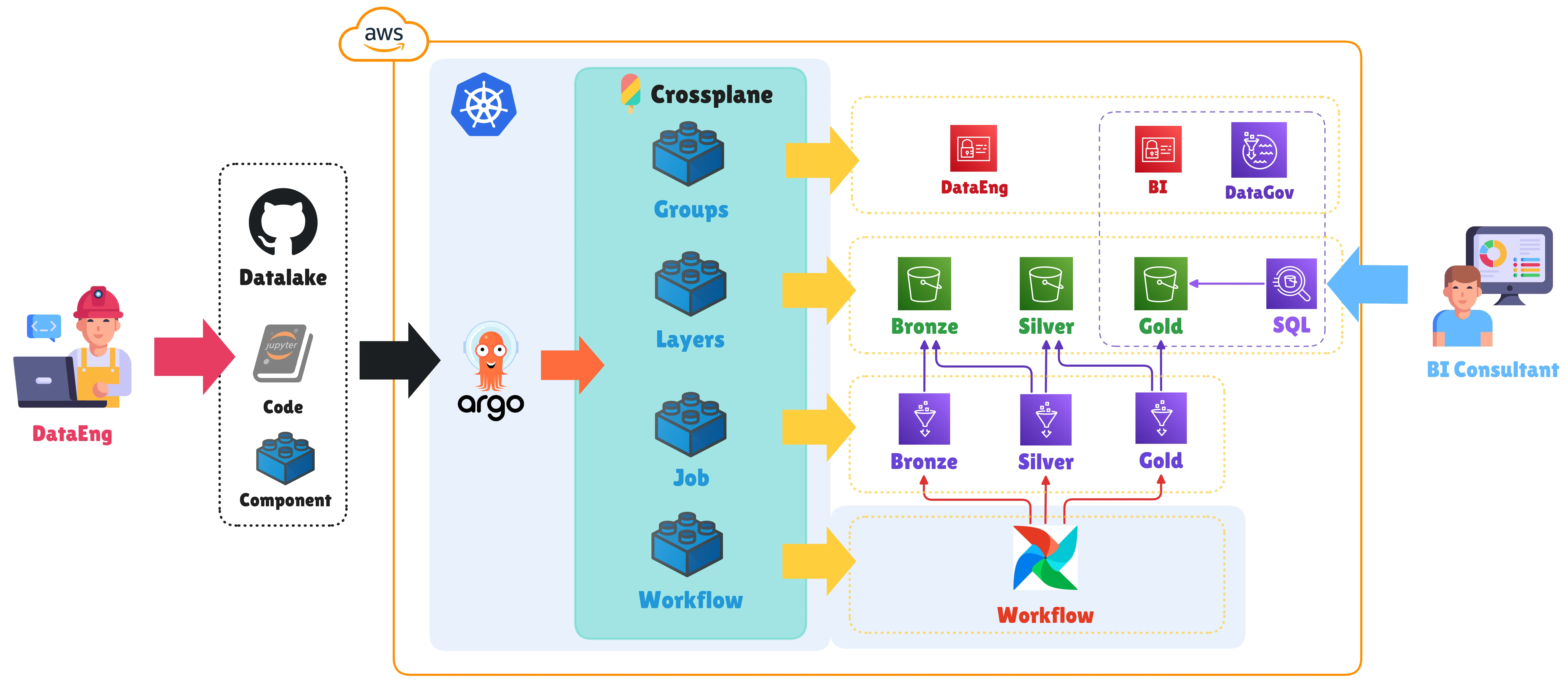
Modern Data Platform Architecture
Introduction
In today’s data engineering ecosystem, infrastructure management has become as critical as data processing itself. Organizations face constant challenges in maintaining consistency, security, and scalability across their data platforms, especially when operating in multi-team environments with varying levels of cloud computing expertise.
This article explores a modern data platform architecture that combines Infrastructure as Code (IaC), GitOps, and complexity abstraction principles through Crossplane and Kubernetes. We’ll analyze how this architecture not only simplifies AWS resource provisioning for Data Lakes but also establishes a framework that allows data teams to focus on what truly matters: transforming data into business value.
What is a Data Platform?
A modern data platform is much more than a collection of cloud tools and services. It’s an abstraction layer that provides data teams with the necessary capabilities to:
- Ingest data from multiple sources reliably
- Transform and process data at scale
- Store data in an optimized and cost-effective manner
- Govern data access and quality
- Serve data to downstream consumers (BI, ML, Analytics)
The key is providing these capabilities through simple, standardized APIs that hide the underlying complexity of cloud infrastructure.
Medallion Architecture: Bronze, Silver, Diamond
One of the most effective architectures for organizing a Data Lake is the Medallion model, which structures data into progressive layers of refinement:
Bronze Layer - Raw Data
The Bronze layer stores data in its rawest form, exactly as it arrives from sources:
- Purpose: Preserve complete historical truth
- Characteristics:
- No transformations (raw data)
- Includes all historical records
- Implements CDC policies via Hash Rows (MD5)
- Snapshots for transactional tables
Bronze extraction example:
# Extraction from Oracle SoftCereal
import hashlib

# Apply Hash Row to detect changes
df['hash_row'] = df.apply(
    lambda row: hashlib.md5(str(row).encode()).hexdigest(),
    axis=1
)

# Save to S3 Bronze
df.write.parquet(
    "s3://dev-company-datalake-bronze/acopio/articulos/"
)
Silver Layer - Refined Data
The Silver layer contains cleaned and normalized data:
- Purpose: Reliable and consistent data
- Transformations:
- Remove duplicates
- Normalize data types
- Rename to standard conventions (snake_case)
- Data quality validation
- Null value handling
Silver transformation example:
# Read from Bronze
df = spark.read.parquet("s3://bronze/acopio/articulos/")

# Cleaning
df = df.dropDuplicates(['id_articulo'])
df = df.withColumnRenamed('IdArticulo', 'id_articulo')
df = df.withColumn('precio', col('precio').cast('decimal(10,2)'))
df = df.filter(col('id_articulo').isNotNull())

# Save to Silver
df.write.parquet("s3://silver/acopio/articulos/")
Diamond Layer - Analytics Data
The Diamond layer presents data optimized for analytical consumption:
- Purpose: Analytics-ready datasets
- Characteristics:
- Data consolidated from multiple sources
- Incremental merge (INSERT/UPDATE/DELETE)
- Synchronized master tables
- Optimized for SQL queries
- Pre-built views for BI
Diamond consolidation example:
import awswrangler as wr

# Read refined data from Silver
df_new = wr.athena.read_sql_query(
    "SELECT * FROM company_silver.acopio_articulos",
    database="company_silver"
)

# Read master table in Diamond
df_master = wr.athena.read_sql_query(
    "SELECT * FROM company_diamond.articulos",
    database="company_diamond"
)

# Incremental MERGE (detect by hash_row)
# - INSERT: new records
# - UPDATE: modified records
# - DELETE: records deleted at source

# Save consolidated
wr.s3.to_parquet(
    df=df_merged,
    path="s3://diamond/articulos/",
    dataset=True,
    mode="overwrite",
    database="company_diamond",
    table="articulos"
)
Crossplane: Declarative Infrastructure as Code
Crossplane transforms Kubernetes into a universal control plane for managing cloud infrastructure through Kubernetes-native resources. Instead of writing imperative scripts or complex templates, you define the desired state of your infrastructure in simple YAML files.
Key Crossplane Components
1. XRDs (Composite Resource Definitions)
XRDs are like API contracts that define what parameters are needed to create resources:
# XRD for Data Lake storage
apiVersion: apiextensions.crossplane.io/v1
kind: CompositeResourceDefinition
metadata:
  name: xdatalakestorages.platform.lycsa.com
spec:
  group: platform.lycsa.com
  names:
    kind: XDatalakeStorage
    plural: xdatalakestorages
  versions:
    - name: v1alpha1
      schema:
        openAPIV3Schema:
          properties:
            spec:
              properties:
                empresa:
                  type: string
                entorno:
                  type: string
                  enum: [dev, prod]
                buckets:
                  type: array
                  items:
                    type: string
                    enum: [bronze, silver, diamond]
This XRD allows users to request S3 buckets without knowing AWS details.
2. Compositions
Compositions translate high-level requests into actual AWS resources:
# Composition to create S3 buckets
apiVersion: apiextensions.crossplane.io/v1
kind: Composition
metadata:
  name: s3-buckets-aws
spec:
  compositeTypeRef:
    apiVersion: platform.lycsa.com/v1alpha1
    kind: XDatalakeStorage
  resources:
    - name: bronze-bucket
      base:
        apiVersion: s3.aws.upbound.io/v1beta1
        kind: Bucket
        spec:
          forProvider:
            region: us-east-1
      patches:
        - type: FromCompositeFieldPath
          fromFieldPath: spec.empresa
          toFieldPath: metadata.name
          transforms:
            - type: string
              string:
                fmt: "%s-datalake-bronze"
3. Claims
Claims are the actual resource requests made by users:
# Request buckets for a Data Lake
apiVersion: platform.lycsa.com/v1alpha1
kind: DatalakeStorage
metadata:
  name: company-datalake
spec:
  empresa: company
  entorno: dev
  buckets:
    - bronze
    - silver
    - diamond
When applying this claim (kubectl apply -f), Crossplane automatically:
- Reads the XRD to validate parameters
- Executes the Composition to generate AWS resources
- Creates the 3 S3 buckets in AWS
- Configures IAM roles with appropriate permissions
- Applies governance tags
GitOps with ArgoCD
GitOps establishes Git as the single source of truth for all infrastructure and configuration. ArgoCD automates continuous synchronization between the Git repository and the Kubernetes cluster.
GitOps Workflow
┌──────────────────────────────────────────────────────────┐
│  1. DEVELOPER: Creates notebook in Git                   │
│     services/notebooks/company/acopio/general-bronze.ipynb│
└──────────────────────────────────────────────────────────┘
                          ▼
┌──────────────────────────────────────────────────────────┐
│  2. GITHUB ACTION: Auto-generates claims                 │
│     claims/notebooks/dev/company-acopio-general-bronze.yaml│
└──────────────────────────────────────────────────────────┘
                          ▼
┌──────────────────────────────────────────────────────────┐
│  3. PULL REQUEST: Review claims                          │
└──────────────────────────────────────────────────────────┘
                          ▼
┌──────────────────────────────────────────────────────────┐
│  4. MERGE TO DEV: Triggers deployment                    │
└──────────────────────────────────────────────────────────┘
                          ▼
┌──────────────────────────────────────────────────────────┐
│  5. ARGOCD: Syncs claims from Git                        │
│     - Reads claims/notebooks/dev/                        │
│     - Applies to Kubernetes cluster                      │
└──────────────────────────────────────────────────────────┘
                          ▼
┌──────────────────────────────────────────────────────────┐
│  6. CROSSPLANE: Processes claims                         │
│     - Executes Glue Spark/Python Shell composition       │
│     - Creates resources in AWS                           │
└──────────────────────────────────────────────────────────┘
                          ▼
┌──────────────────────────────────────────────────────────┐
│  7. AWS: Resources created                               │
│     - AWS Glue Job                                       │
│     - IAM Role with permissions                          │
│     - CloudWatch Log Group                               │
│     - Script in S3                                       │
└──────────────────────────────────────────────────────────┘
ArgoCD Application Configuration
apiVersion: argoproj.io/v1alpha1
kind: Application
metadata:
  name: dev-datalake-notebooks
spec:
  source:
    repoURL: git@github.com:company/datalake.git
    targetRevision: dev
    path: claims/notebooks/dev/
  destination:
    server: https://kubernetes.default.svc
    namespace: crossplane-system
  syncPolicy:
    automated:
      prune: true # Remove resources not in Git
      selfHeal: true # Revert manual changes
With this configuration, any change in Git is automatically reflected in AWS without manual intervention.
CI/CD: Claims Automation
GitHub Actions automates the generation and validation of claims based on code (notebooks and functions).
Workflow: Generate Claims
This workflow detects new files and automatically generates claims:
name: Generate Claims

on:
  push:
    branches-ignore:
      - dev
      - prod
    paths:
      - "services/notebooks/**/*.ipynb"
      - "services/functions/**/*.py"

jobs:
  generate:
    runs-on: ubuntu-latest
    steps:
      - name: Detect new files
        run: |
          # Identify added notebooks or functions
          git diff --name-only --diff-filter=A HEAD^

      - name: Extract metadata from path
        run: |
          # services/notebooks/company/product/topic-layer.ipynb
          # → company=company, product=product, topic=topic, layer=layer

      - name: Generate claims
        run: |
          # Use corresponding template
          # Replace placeholders with extracted values
          # Generate commit SHA

      - name: Commit claims
        run: |
          git add claims/
          git commit -m "Auto-generate claims for new files"
          git push
Workflow: Deploy Notebook Jobs
This workflow validates and deploys Glue jobs when there are changes in dev/prod:
name: Deploy Notebook Jobs

on:
  push:
    branches:
      - dev
      - prod
    paths:
      - "claims/notebooks/**"

jobs:
  deploy:
    runs-on: ubuntu-latest
    steps:
      - name: Validate YAML
        run: yamllint claims/notebooks/

      - name: Validate schema against XRD
        run: kubectl apply --dry-run=client -f claims/

      - name: Apply claims
        run: kubectl apply -f claims/notebooks/${{ github.ref_name }}/

      - name: Verify deployment
        run: kubectl wait --for=condition=Ready datalakejob --all
ETL Processing with AWS Glue
AWS Glue provides two types of jobs for different needs:
Spark Jobs - For Big Data
When to use:
- Large datasets (>100GB)
- Complex joins between tables
- Distributed aggregations
- Parallel processing of millions of records
Configuration:
apiVersion: platform.lycsa.com/v1alpha1
kind: DatalakeJob
metadata:
  name: company-acopio-consolidado-silver
spec:
  compositionSelector:
    matchLabels:
      platform.lycsa.com/job-type: "spark"
  empresa: company
  producto: acopio
  topic: consolidado
  layer: silver
  glueConfig:
    workerType: G.2X # 8 vCPU, 32GB RAM
    numberOfWorkers: 10 # Parallel processing
    timeout: 60 # minutes
    maxRetries: 2
Spark code:
from pyspark.context import SparkContext
from awsglue.context import GlueContext

sc = SparkContext()
glueContext = GlueContext(sc)
spark = glueContext.spark_session

# Read millions of records in parallel
df = spark.read.parquet("s3://bronze/acopio/comprobantes/")

# Distributed transformations
df_cleaned = (
    df.filter(col('fecha') >= '2024-01-01')
      .join(articulos, 'id_articulo')
      .groupBy('planta', 'mes')
      .agg(sum('cantidad').alias('total_cantidad'))
)

# Write partitioned
df_cleaned.write.partitionBy('mes').parquet(
    "s3://silver/acopio/comprobantes_agg/"
)
Python Shell Jobs - For Lightweight Tasks
When to use:
- Small files (<100MB)
- External API calls
- Validation scripts
- Maintenance tasks
- Lower operational cost (~$0.44/hour vs ~$0.96/hour)
Configuration:
apiVersion: platform.lycsa.com/v1alpha1
kind: DatalakeJob
metadata:
  name: company-validador-calidad-bronze
spec:
  compositionSelector:
    matchLabels:
      platform.lycsa.com/job-type: "python-shell"
  empresa: company
  producto: validador
  topic: calidad
  layer: bronze
  glueConfig:
    maxCapacity: 0.0625 # 1/16 DPU
    timeout: 20
Python Shell code:
import pandas as pd
import awswrangler as wr
import requests

# Call external API
response = requests.get('https://api.example.com/cotizaciones')
data = response.json()

# Process with pandas
df = pd.DataFrame(data)
df['fecha'] = pd.to_datetime(df['fecha'])
df = df[df['precio'] > 0]

# Save to S3
wr.s3.to_parquet(
    df=df,
    path='s3://bronze/cotizaciones/',
    dataset=True
)
Serverless with AWS Lambda
Lambda Functions provide real-time processing for events:
Use cases:
- Process files when they arrive in S3
- Validate data quality before moving between layers
- Send notifications for failed jobs
- Lightweight and fast transformations
Lambda Claim:
apiVersion: platform.lycsa.com/v1alpha1
kind: DatalakeFunction
metadata:
  name: company-validador-csv-bronze
spec:
  empresa: company
  producto: validador
  topic: csv
  layer: bronze
  lambdaConfig:
    runtime: python3.11
    timeout: 300
    memorySize: 1024
    enableXRayTracing: true
  imageConfig:
    ecrRepository: "dev-company-datalake-validador-csv"
  environmentVariables:
    BUCKET_BRONZE: "dev-company-datalake-bronze"
    BUCKET_SILVER: "dev-company-datalake-silver"
Lambda code:
import json
import boto3
import pandas as pd
from io import StringIO

s3 = boto3.client('s3')

def lambda_handler(event, context):
    """
    Validates CSV files when they arrive in S3 Bronze
    """
    # Get S3 event info
    bucket = event['Records'][0]['s3']['bucket']['name']
    key = event['Records'][0]['s3']['object']['key']

    # Read file
    obj = s3.get_object(Bucket=bucket, Key=key)
    df = pd.read_csv(StringIO(obj['Body'].read().decode('utf-8')))

    # Validations
    validations = {
        'has_data': len(df) > 0,
        'no_nulls': df.isnull().sum().sum() == 0,
        'valid_dates': pd.to_datetime(df['fecha'], errors='coerce').notna().all()
    }

    # If all validations pass, move to Silver
    if all(validations.values()):
        target_bucket = 'dev-company-datalake-silver'
        s3.copy_object(
            Bucket=target_bucket,
            Key=key,
            CopySource={'Bucket': bucket, 'Key': key}
        )
        return {
            'statusCode': 200,
            'body': json.dumps('File validated and moved to Silver')
        }
    else:
        return {
            'statusCode': 400,
            'body': json.dumps(f'Validation failed: {validations}')
        }
Governance and Security
Access Control with IAM
The platform creates IAM groups with specific permissions for different roles:
apiVersion: platform.lycsa.com/v1alpha1
kind: DatalakeUsers
metadata:
  name: bi-team
spec:
  teamName: bi-team
  empresa: company
  producto: acopio
  permissions:
    athena:
      - StartQueryExecution
      - GetQueryResults
      - GetQueryExecution
    s3:
      - ListBucket
      - GetObject # Read-only
    glue:
      - GetDatabase
      - GetTable
      - GetPartitions
Automatic Tags
All resources include tags for traceability:
| Tag | Description | Example |
|---|---|---|
| Environment | Environment | dev, prod |
| Company | Company | company-name |
| Product | Product | acopio |
| Layer | Data layer | bronze, silver, diamond |
| CreatedBy | Creator system | platform-lycsa |
| ManagedBy | Manager | crossplane |
Standardized Naming
The platform applies consistent conventions:
S3 Buckets:
  {environment}-{company}-datalake-{layer}-{digits}-{region}
  dev-company-datalake-bronze-7664-us-east-1

Glue Jobs:
  {environment}-{company}-{product}-{topic}-{layer}
  dev-company-acopio-general-bronze

Lambda Functions:
  {environment}-{company}-{product}-{topic}-{layer}
  dev-company-validador-calidad-silver
Benefits of This Architecture
1. Complexity Abstraction
Data teams don’t need to:
- Know AWS details in depth
- Write CloudFormation or Terraform
- Manually configure IAM permissions
- Manage secrets and credentials
They only need to define what they want in simple YAML.
2. Standardization and Governance
- Automatic consistent naming
- Mandatory tags for all resources
- Pre-validated security policies
- Version control with Git
- Complete audit trail of changes
3. Development Velocity
- Infrastructure provisioning in minutes
- Claims auto-generated from code
- Deployment without manual intervention
- Easy rollback to previous versions
4. Multi-Environment
- Environment-specific configurations
- Controlled promotion dev → prod
- Complete isolation between environments
- Optimized costs per environment
5. Observability
- Centralized logs in CloudWatch
- X-Ray tracing in production
- Kubernetes and AWS metrics
- State visibility via ArgoCD
Conclusion
A modern data platform is not just a set of technologies, but a work philosophy that prioritizes:
- Simplicity over technical complexity
- Declarative over imperative
- GitOps over manual changes
- Security by default
- Developer Experience as a key metric
The combination of Crossplane, GitOps with ArgoCD, and Medallion architecture provides a robust framework that allows organizations to scale their data capabilities without scaling operational complexity.
Data teams can focus on what truly matters: transforming data into actionable insights, while the platform handles infrastructure, security, and governance.
This architecture not only reduces time-to-market for new data projects but also establishes the foundation for a more mature data engineering culture, where reproducibility, quality, and security are first-class citizens.