Autogasto — Vision-based Expense Bot
ActiveLogging an expense had to cost the same as photographing the receipt. A Telegram bot with GPT-4o Vision does the rest: extracts the data, validates it and persists it.
- Role
- Author
- Period
- 2026
The problem
Expense tracking fails through friction, not lack of will. Any system that requires opening an app, picking a category and typing amounts gets abandoned within two weeks — the effort per expense exceeds the perceived value of having it recorded.
The conclusion was to invert the framing: instead of improving the form, remove it. The only acceptable gesture is the one you already make anyway — photographing the receipt.
The solution
A Telegram bot you send the photo to, and that’s it. Telegram works as the interface here because it’s already installed, already authenticated and already supports sending photos frictionlessly: no app to install, no account to create.
The full flow:
- The user sends the receipt photo to the bot.
- The bot receives the webhook, downloads the image and passes it to the API.
- The API uploads the image to Supabase Storage and calls GPT-4o with the extraction prompt.
- GPT-4o returns structured JSON with the expense data.
- The data is persisted to the
gastostable. - The bot replies with a summary of what was recorded.
Architecture
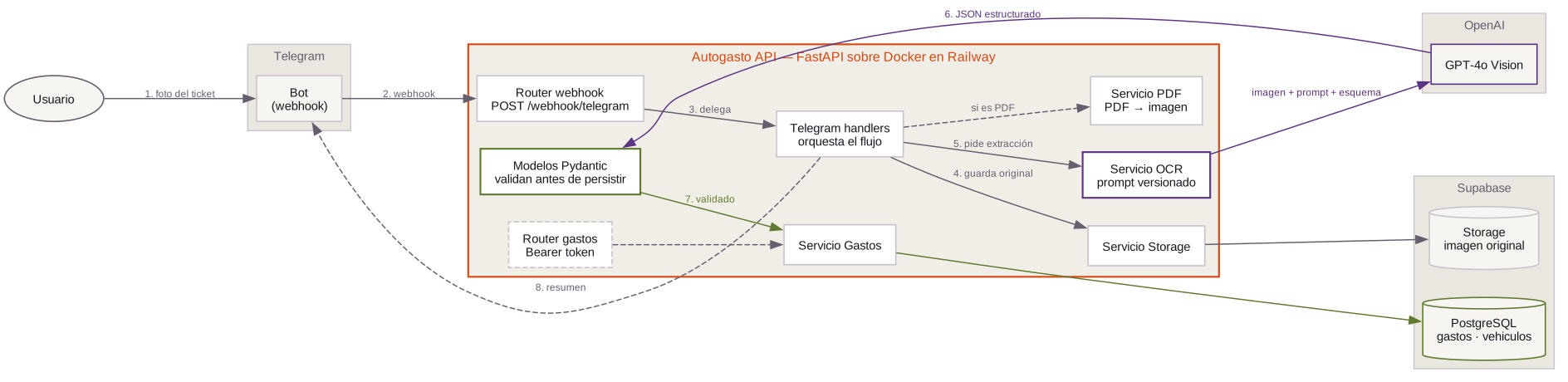
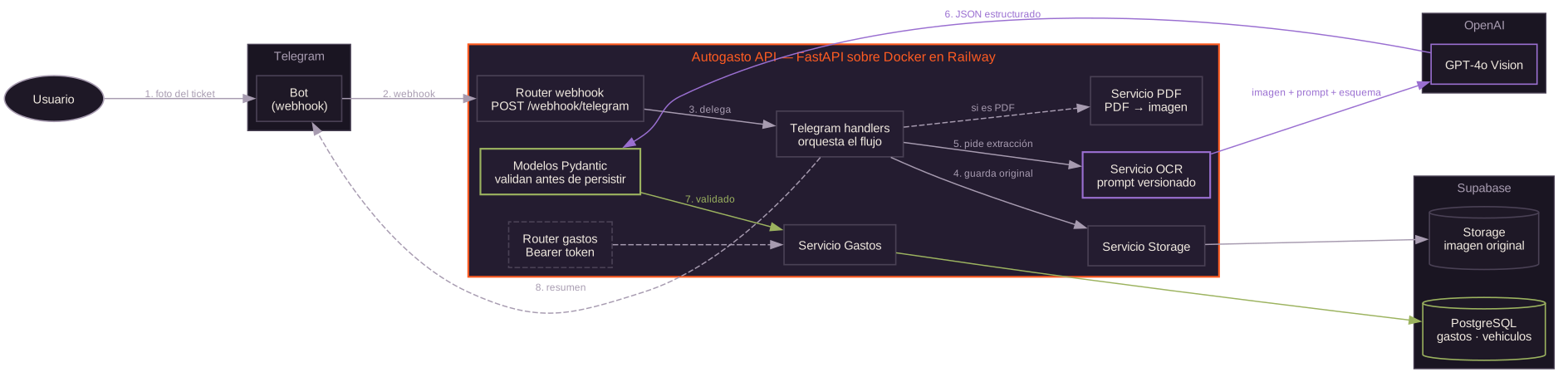
architecture/autogasto/.FastAPI backend, organized by responsibility:
app/
├── main.py              # app, lifespan, rate limiting
├── config.py            # configuration via pydantic-settings
├── deps.py              # require_api_key (Bearer token)
├── models/              # GastoCreate, GastoResponse, Vehiculo
├── prompts/
│   └── extraccion.py    # GPT-4o system prompt + output schema
├── routers/
│   ├── gastos.py        # CRUD protected with API key
│   └── webhook.py       # POST /webhook/telegram
├── services/
│   ├── ocr.py           # GPT-4o Vision call
│   ├── pdf.py           # PDF → image conversion
│   ├── storage.py       # upload to Supabase Storage
│   └── gastos.py        # Supabase queries
└── telegram/
    ├── handlers.py      # bot logic
    └── messages.py      # response formatting
Decisions worth making
The prompt is code, not configuration. It lives in prompts/extraccion.py alongside the output schema, versioned with everything else. A prompt change is a reviewable commit, not an invisible tweak in a dashboard.
Explicit output schema. GPT-4o returns structured JSON against a declared schema, and Pydantic models validate it before it touches the database. The model can get an amount wrong, but it cannot break the format.
PDF receipts are converted to images before OCR, so there is a single extraction path instead of two branches to maintain.
The webhook is separated from the CRUD. /webhook/telegram is public by necessity; /gastos is protected with a Bearer token. Keeping them in distinct routers makes that difference obvious when reading the code.
Deployment
Docker on Railway, with automatic domain and TLS. Supabase migrations are versioned as SQL in chronological order, and dependencies are pinned in a requirements.lock generated with pip-compile.
Status
In personal use. The repository is private.