Two Planes Moving at Different Speeds
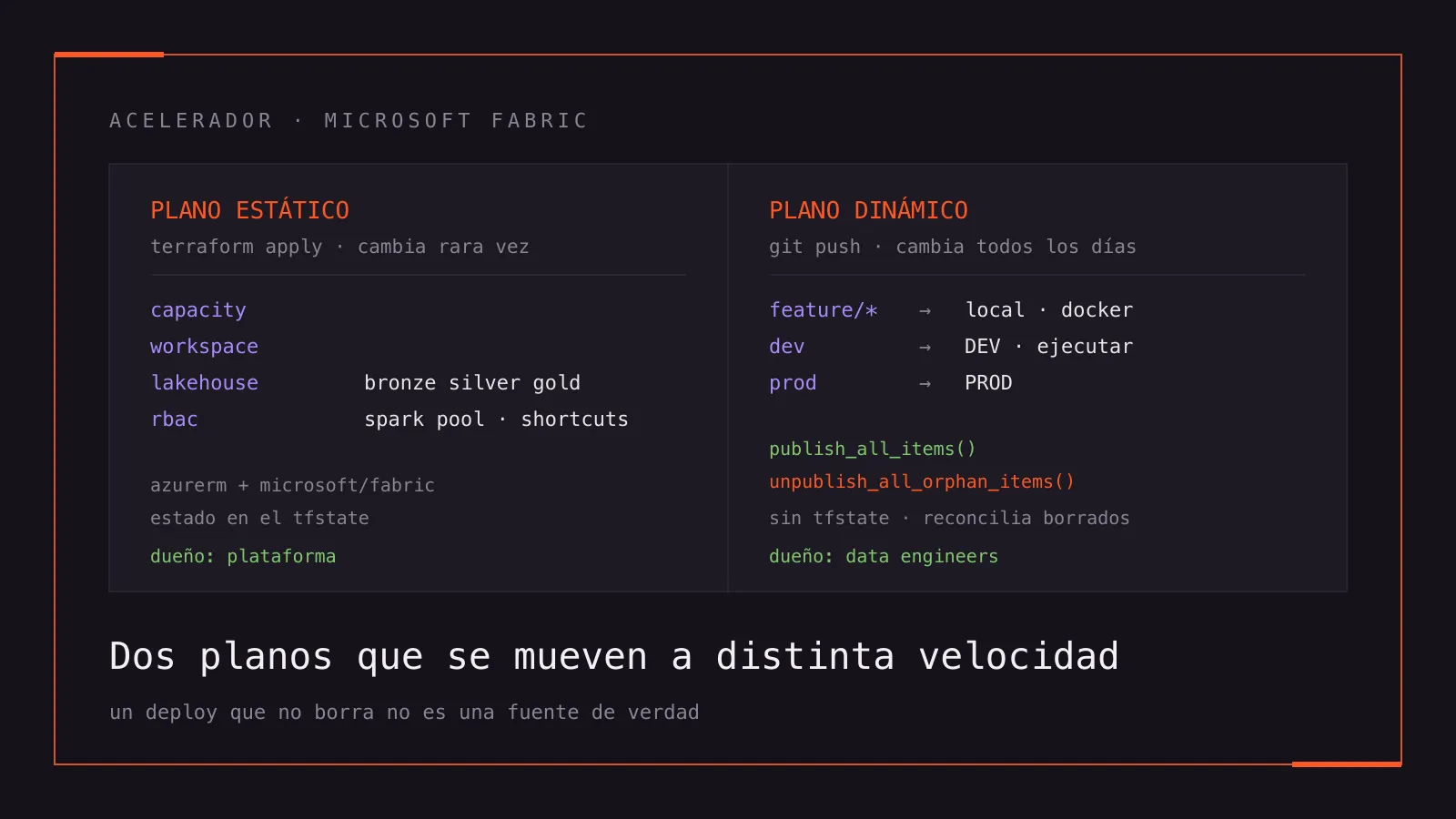
Two Planes Moving at Different Speeds
The thesis
A data platform is not one thing you deploy. It’s two, and treating them as one is the mistake you pay for on every release.
I learned it building an accelerator for Microsoft Fabric: the repository a team copies on day one of a project, and from which the capacity, the workspace, the medallion lakehouses, the permissions, the CI/CD and a local development environment all come out with no decisions left open. The point of an accelerator is that nobody has to relitigate how a lakehouse is named or how a notebook gets promoted to production.
The first version tried to manage all of it with Terraform. It worked beautifully. Until the first notebook showed up.
This post is about that fracture, about the technologies each side ended up using, and about a handful of things Fabric doesn’t tell you until you hit them.
Here’s how it ended up, with the two planes side by side and the same destination underneath:
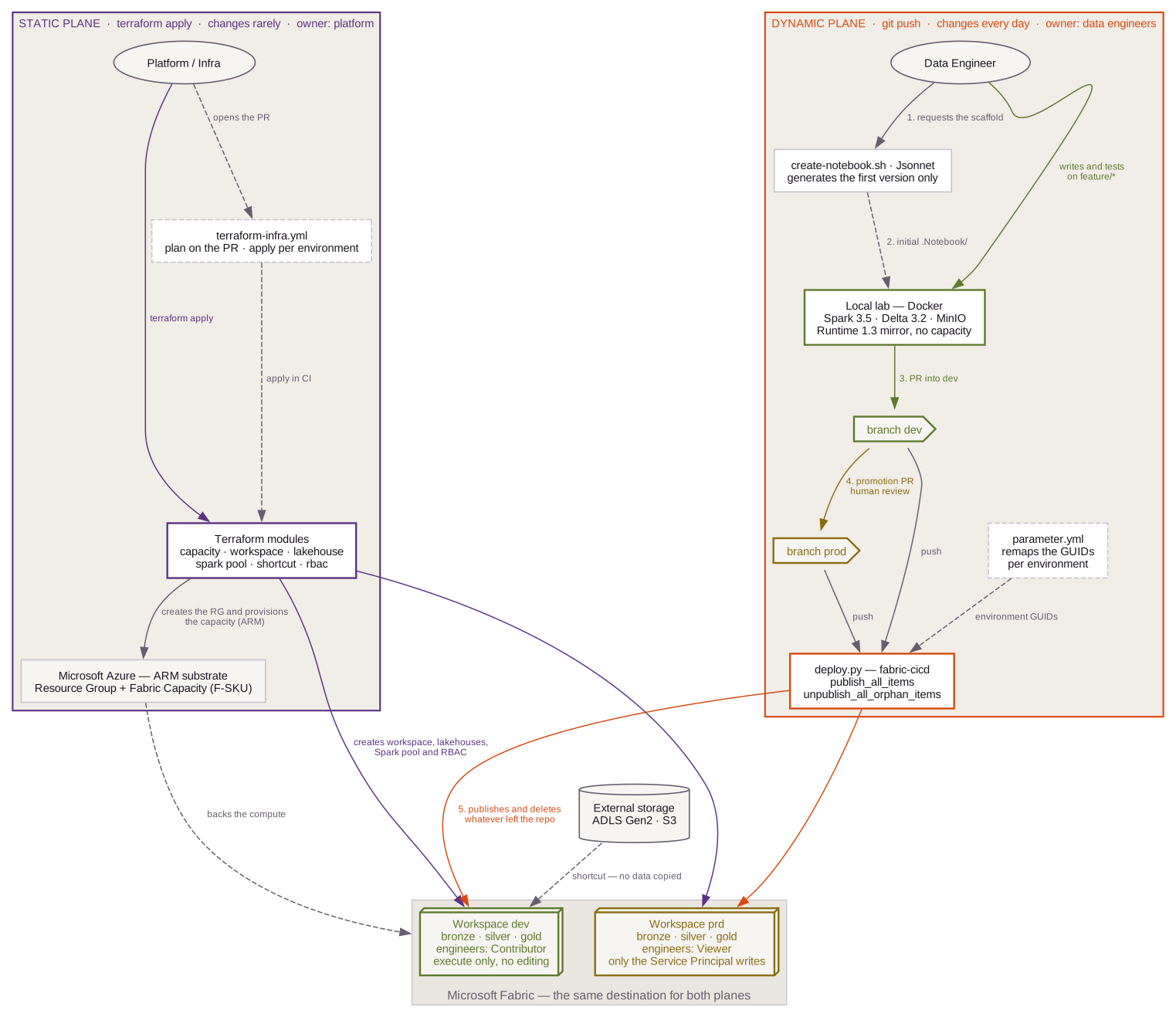
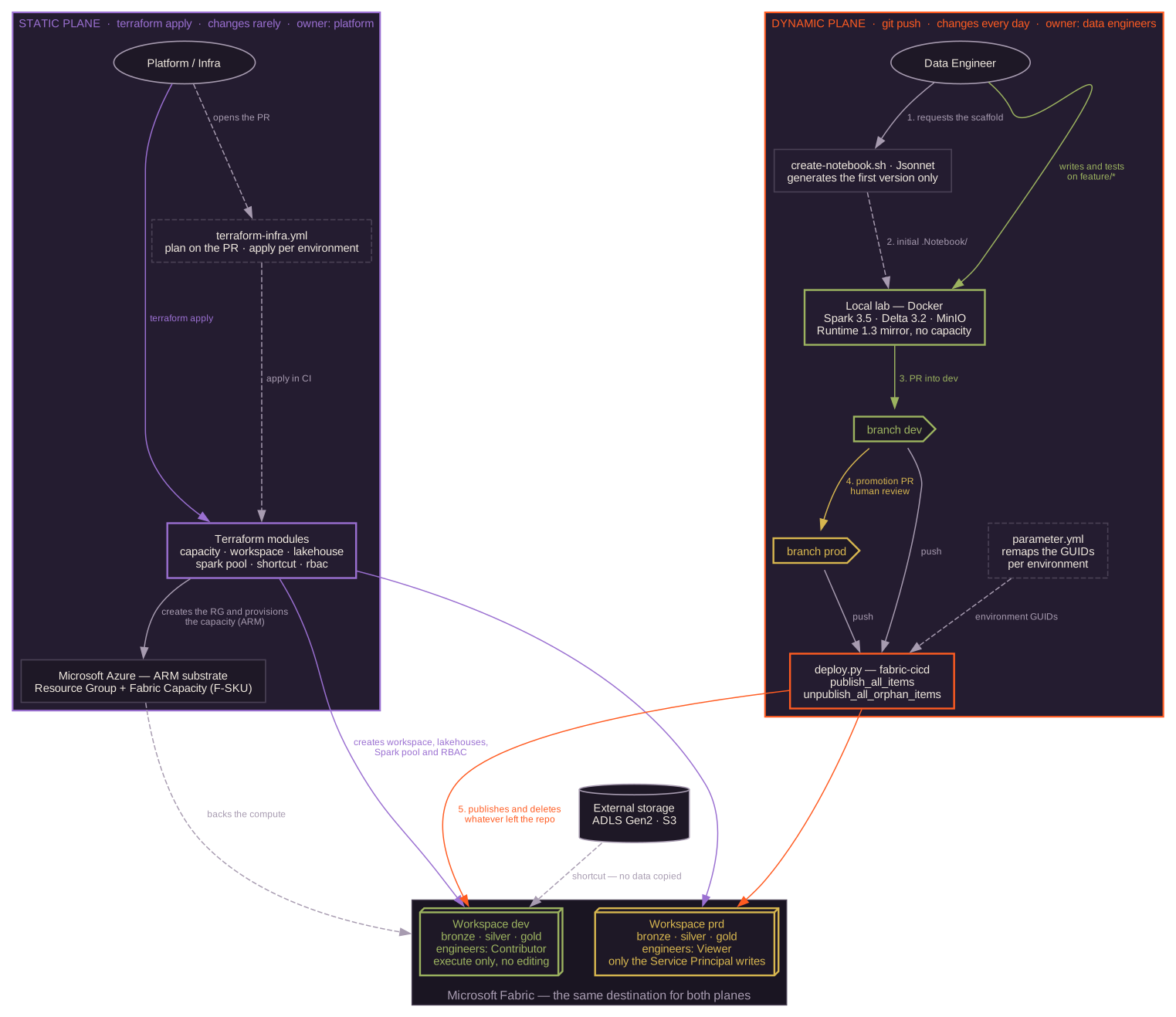
architecture/fabric-dos-planos/.The static plane: two providers, because Fabric is split down the middle
Whatever gets provisioned once and changes rarely is Terraform, no argument: resource group, capacity, workspace, the three medallion lakehouses, the Spark pool, the environment, shortcuts to external storage, and RBAC.
The first surprise is that you need two providers at the same time:
| Provider | Manages |
|---|---|
hashicorp/azurerm | Resource Group + Fabric Capacity — Azure ARM resources |
microsoft/fabric | Workspace, lakehouses, environment, Spark, RBAC — they live inside Fabric, with their own API and their own GUIDs |
It’s not a design preference: the capacity is billed by Azure and governed by ARM, while everything living inside the workspace is governed by the Fabric API, with identifiers that are not the ARM resource ID. The capacity module ends up resolving that internal GUID through a data source and handing it to the workspace, which is the glue between the two worlds.
That produces a gotcha that cost me an afternoon. I wanted a single root
composition with a create_capacity = false flag for tenants where the
capacity already exists. Not enough:
Error: building account: could not acquire access token to parse claims:
AADSTS90002: Tenant '...' not found. ... this may happen if there are no
active subscriptions for the tenant
  with provider["registry.terraform.io/hashicorp/azurerm"]
The azurerm provider acquires a management.azure.com token at configure
time, even when every one of its resources is at count = 0. Terraform does
not prune a declared provider. So in a test tenant with no Azure subscription
— a Fabric Trial, say — the composition fails before planning a single line.
A provider is not a lazy dependency. It configures because it’s declared, not because you use it.
The fix was two root compositions that create exactly the same Fabric resources
and differ only in whether they declare azurerm at all.
Two more provider quirks
Lakehouses reject hyphens. dev-mycompany-lakehouse-bronze returns an
opaque InvalidParameter, while a workspace with the same pattern is created
without complaint. The reason is that a lakehouse displayName doubles as the
SQL identifier of its endpoint, so you have to derive
dev_mycompany_lakehouse_bronze. It’s specific to lakehouses: workspace,
environment and Spark pool take hyphens fine.
The real executor ceiling is one below what it looks like. Fabric reserves
one pool node for the driver, so the maximum number of dynamic executors has
to be autoscale_max_nodes - 1. Go over it and the error doesn’t arrive at
plan time: it arrives mid-apply, with the workspace half-built. It ended up
as a lifecycle.precondition on the pool resource.
Every validation you can move from apply time to plan time pays for itself the first time somebody hits it.
Why a notebook doesn’t belong in the tfstate
Now the other side. A data engineer creates notebooks constantly, edits them every day, and asks nobody in infrastructure for permission to do it.
Terraform is excellent for things that have state and change rarely. A notebook
has exactly the inverse property: its content changes all the time, and keeping
that in a .tfstate means every line of PySpark goes through a
terraform apply. The repo still carries the module that tried it, marked
deprecated, so nobody rediscovers it thinking it’s a good idea.
The second attempt was an imperative CLI: an import that pushes notebooks
into the workspace. It publishes fine. The problem is what it doesn’t do:
delete a notebook from the repo and it stays alive in the workspace. That’s the
moment “the repository is the source of truth” quietly stops being true — the
first time somebody deletes something.
The difference between a deploy and a sync is whether it deletes.
The third attempt is the one that stuck: fabric-cicd, Microsoft’s library for declarative deployment. Two calls:
publish_all_items(workspace)          # creates and updates what's in the repo
unpublish_all_orphan_items(workspace) # deletes from the workspace what isn't
That second line is what turns the repo into a source of truth. Everything else in the dynamic plane rests on it.
Three-tier GitOps
With that settled, the model landed like this:
feature/*   →   local      Docker: Spark + Delta + MinIO. Authoring and testing.
                           Never touches Fabric. Burns no capacity.
    │
    ▼ PR
  dev       →   DEV        Automatic deploy. EXECUTION only, no editing.
                           Engineers: Contributor.
    │
    ▼ PR (human review)
  prod      →   PROD       Same workflow, same script, different workspace.
                           Engineers: Viewer. Only the Service Principal writes.
Both environments are targets of the same script and the same workflow. The only thing that changes is the (environment, workspace) pair, and it’s derived from the branch in exactly one place:
case "${{ github.ref_name }}" in
  dev)  environment=DEV;  workspace_id="$DEV_WORKSPACE_ID" ;;
  prod) environment=PROD; workspace_id="$PRD_WORKSPACE_ID" ;;
  *)    echo "::error::branch has no environment"; exit 1 ;;
esac

[ -n "$workspace_id" ] || { echo "::error::missing secret"; exit 1; }
That exit 1 on the last line isn’t paranoia. Notebooks reference their
lakehouse by GUID, and a parameter file remaps those GUIDs per environment
during the publish. If the pair drifts — environment DEV pointing at the
production workspace, say — fabric-cicd publishes without remapping
anything, and one environment’s notebooks end up reading the other’s
lakehouse. Fabric doesn’t object: a cross-workspace reference is perfectly
valid to the platform. You find out weeks later, staring at numbers that don’t
add up.
The feature we chose not to use
Fabric ships Git Integration: bidirectional sync between a workspace and a branch. The engineer edits in the UI and Fabric commits back to the repo. It sounds like what you want.
We dropped it, and it was one of the best decisions in the project. With Git Integration active on a workspace that also receives deploys, you have two writers competing for the same state: the engineer from the UI and the pipeline from the branch. There’s no way for “the repo is the only truth” and “the UI writes to the repo” to coexist without somebody losing changes.
The unexpected benefit was in attack surface. Git Integration needs a GitHub PAT stored as a Connection inside Fabric, plus a specific tenant setting enabled. Both requirements exist because in that model Fabric is the client calling GitHub’s API. In the deploy model it’s the reverse — GitHub Actions calls Fabric — and the only credential is the Service Principal Terraform was already using.
Every bidirectional integration you remove hands you back a credential you no longer have to rotate.
The Terraform module that configures it is still in the repo, working and unused, documented as a reference. An accelerator should be able to show the road it didn’t take.
The tier that gets used most is the one that never touches the cloud
If I had to keep a single piece of the accelerator, it would be this one, and
it’s the least glamorous: a docker-compose.yml that mirrors the Fabric
runtime on your machine.
minio          # OneLake / ADLS stand-in: S3-compatible, bronze/silver/gold
               # as folders in a bucket
spark-master   # apache/spark:3.5.3
spark-worker
jupyter        # delta-spark 3.2.0 + hadoop-aws to speak s3a with MinIO
The versions aren’t arbitrary: Fabric Runtime 1.3 is Apache Spark 3.5 + Delta
Lake 3.2. The lab pins both and opens through Dev Containers, so the whole
cycle is code . → Reopen in Container.
The math is simple. Iterating a notebook against real Fabric is a minutes-long cycle that also burns capacity — that is, money. Locally it’s seconds and it’s free. For 90 % of what you do while writing a pipe — syntax, transformations, testing a Delta merge against a small sample — you don’t need the cloud.
And it’s worth being honest about where the mirror ends: no OneLake, no shortcuts, no SQL endpoint, no V-Order. What you test locally is the logic; the finished pipe gets validated in DEV against real Fabric.
A local mirror doesn’t have to be faithful. It has to be faithful in the part you iterate on.
What the platform won’t let you express
I wanted one concrete rule: in DEV, engineers execute notebooks but don’t edit them. Executing is necessary — you have to validate against real data; editing breaks the model, because the repo is the source of truth.
It doesn’t exist. Fabric’s workspace roles put “execute or cancel a notebook” and “write or delete a notebook” on the same rung: Admin, Member and Contributor have both; Viewer has neither, and a Viewer can’t even execute. There’s no middle role, and there isn’t one because the permission matrix was never designed for that distinction.
The way out wasn’t to keep pushing on permissions — it was reaching the same
policy by another route. Since every deploy runs
unpublish_all_orphan_items, anything hand-edited in the UI disappears on
the next push. The guarantee doesn’t come from the permission: it comes from
the mechanism making the edit pointless.
When the platform can’t express your policy, don’t write it in a document. Make it a consequence of the mechanism.
In production you get both: Viewer by permission, and reconciliation just in
case.
The failures that don’t fail
Looking at the finished repo, I realized nearly every guard I wrote protects against the same class of error: the one that doesn’t error.
- A drifted (environment, workspace) pair publishes to the wrong lakehouse, and Fabric accepts it.
- Notebooks store the lakehouse name alongside the GUID. Fabric resolves by
GUID, so if the name isn’t remapped nothing breaks — but a production
notebook shows
dev_...in the UI and in error messages, and the next diagnosis starts off crooked. - The repo stores item names without an environment prefix; the deploy adds
it based on the branch. Commit one by hand and you’d publish
dev-dev-..., while the production branch would publish an item calleddev-.... - Renaming a published item is not an update: fabric-cicd matches on
(displayName, type), doesn’t find it, creates a new one, and the orphan cleanup deletes the old. With notebooks the effect is just that rotation; with a stateful item, it isn’t.
Each of those became an explicit exit 1 with a message naming the file to
fix. A job that fails in thirty seconds is infinitely cheaper than a number
that’s been wrong for three weeks.
The full stack, and why each piece
| Piece | Role |
|---|---|
Terraform + azurerm + microsoft/fabric | Static plane. One module per resource, one composition per capacity case. |
| fabric-cicd (Python) | Dynamic plane. Declarative publishing with delete reconciliation. |
| Jsonnet | Notebook scaffolding: medallion skeleton + item metadata, with the right naming. |
| GitHub Actions | Both planes: plan on the PR and apply per environment; notebook deploys by branch. |
| Docker + Dev Containers | The local lab mirroring Runtime 1.3. |
| Spark 3.5 · Delta 3.2 · MinIO | What’s inside that lab. |
| LikeC4 | The architecture diagram, as code validated in CI. |
| checkov · trivy | Security scanning of the IaC. |
Two choices deserve their own line.
Jsonnet generates the first version and never again. The temptation to let a generator permanently own the file is strong, and it’s a trap: the day the engineer writes business logic, generator and file diverge, and re-running it destroys work. The scaffold guarantees a consistent starting point; from there the owner is a person.
LikeC4 instead of a PNG. The architecture diagram is text, it lives next to the code it describes, and it’s validated in CI. A PNG in a shared drive has an expiration date nobody writes down and everybody knows.
What I take away
- Split by rate of change, not by technology. The two questions are who owns this change? and how often does it change?. If the answers differ, you have two planes, and forcing them into one mechanism will hurt on both sides.
- A deploy that doesn’t delete is not a source of truth. It’s an import with good PR.
- Move validations into the plan. An error mid-apply leaves the system in a state nobody designed.
- If the platform can’t express your policy, find the mechanism that makes it inevitable. Writing it in the docs doesn’t count.
- Silent failures are the work. Whatever breaks loudly is already solved: somebody sees it and fixes it. What you have to design for is the thing that works wrong without saying so.
The accelerator is ready for whatever project comes next. But what I take away isn’t the repo: it’s that the first question in front of any platform isn’t which tool to use, but how many different things I’m treating as one.